Free browser tool · no account needed
Free U.S. State Map Maker from CSV
Turn a spreadsheet into a shaded map of the United States. Paste cells from Excel or Google Sheets, style the map, and download it for your report.
Make your map →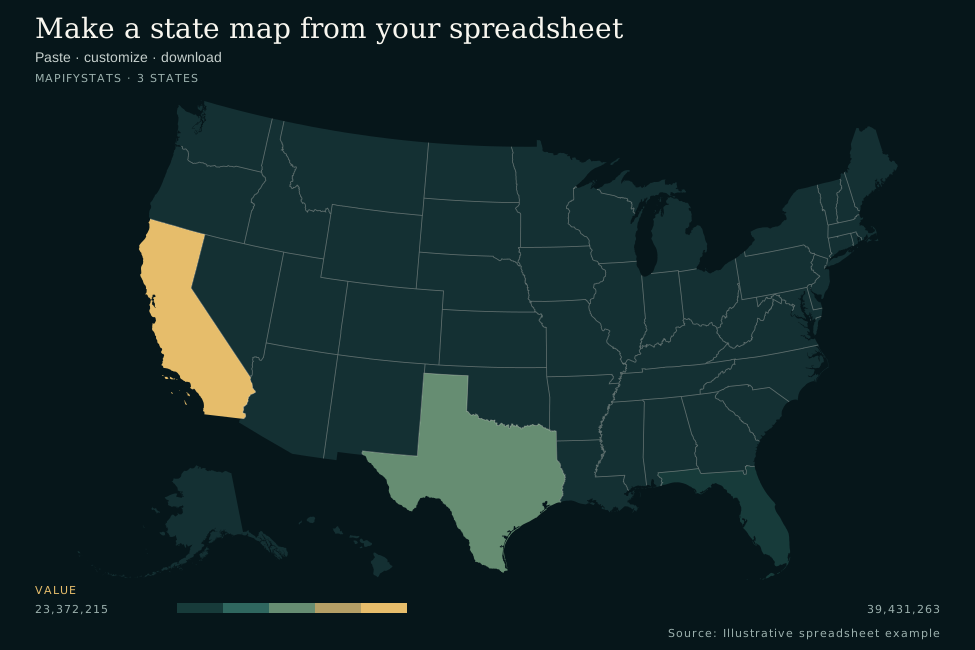
A spreadsheet you can use today
Put state names or two-letter codes in the first column and one or more numeric metrics in the remaining columns. Any numeric heading is supported. This illustrative example maps three states; unlisted states appear without data.
State       Value
California  39431263
Texas       31290831
Florida     23372215
Download the CSV template ↓
1. Paste or upload
Copy both columns, including headers, from Excel or Google Sheets. Paste the tab-separated cells below, or upload a CSV or TSV file.
2. Draw and check
Review the geography column, numeric metric, units, title and source in the import preview. Confirm the review, select Draw map and check matched and skipped rows. Then customize the palette and labels.
3. Download your map
Export a 2× PNG for slides or an editable SVG for publishing. Your data and draft stay in your browser.
Supported spreadsheet formats
CSV uses commas between columns; TSV uses tabs. Include a header such as State,Value, State,Population or State,Rate. Use full U.S. state names or postal abbreviations. The District of Columbia is supported as DC. Uploads are limited to 2 MB and 500 rows.
In CSV, write comma-formatted values with quotes: California,"39,431,263". Or remove thousands separators. Direct spreadsheet pastes use tabs, so California[TAB]39,431,263 works. The tool rejects rows with too many or too few fields rather than guessing.
Want a complete dataset? Explore 2025 population growth for all 50 states and DC, then customize that map.
Browser map maker
Start with a spreadsheet
Make the map.
Use state values for a shaded map or coordinates for proportional points. Your work autosaves locally and never leaves this browser.
8 states mapped
Data preview
First 8 matched rowsRow check
Skipped rows and reasons- 01
Bring data
Paste from a spreadsheet, upload a CSV, or start with a useful example.
- 02
Check & style
See matched rows, fix rejected data, and control labels, numbers, and color.
- 03
Publish
Download a ready-to-share 2× PNG or a clean, editable SVG.